
On-Page SEO: The Complete Step-by-Step Guide (2026)
On-page SEO is the part of search you control completely: the words, structure and signals on your own pages. This guide takes you through each element in the order you would work on a real page, from choosing the query to writing the title, structuring the content and measuring the result, so that every page you publish shows Google and your customers exactly what you are good at.
- On-page SEO makes the value of a page clear to searchers and search engines. It works alongside technical SEO and off-page authority.
- Give each page one main query and match the intent behind it before you write.
- The title tag is your strongest on-page signal and your advertisement in the results. Write it for the click as well as the keyword.
- Lead with the answer, cover the topic fully in your own words and structure it with descriptive headings.
- Descriptive URLs, optimised images, internal links and valid structured data complete the page.
- Measure in Search Console, then improve titles and content where impressions are high and clicks are low.
What on-page SEO is, and where it fits
On-page SEO is the work you do on a page itself so that it ranks for the right searches and persuades the people who find it. It covers the title and description, the URL, the headings, the text, the images, the links and the structured data.
It is one of three parts of search optimisation. Technical SEO makes sure search engines can reach, render and index your site. Off-page SEO builds the authority that comes from other sites linking to and mentioning you. On-page SEO sits between them: it turns what you know into pages that deserve to rank. Our comparison of on-page and off-page SEO shows how the parts support each other.
On-page work has a particular appeal for a business owner. You do not need anyone’s permission to do it, the results are measurable, and the raw material is your own expertise. The steps below follow the order you would use on a real page.
One caveat before the step-by-step: on-page work makes an existing advantage visible, it does not create one. If the page repeats what the top ten already say, read how information gain decides which original content ranks before investing in the steps below.
If you want the practical next step on this point, our guide on Cheap Website Hosting Guide to Save Money Online in 2025 (Real Feedback) goes into the detail.
Step 1: Choose one query and understand its intent
Every strong page starts with a decision about who it is for. Pick one main query that a real customer types and that the page can answer better than what ranks today. Related phrases will follow naturally; a page built around one clear topic usually ranks for many variations of it.
Then look at the intent. Search the query and study the first page of results. If they are guides, the searcher wants to learn. If they are product or service pages, the searcher wants to buy or compare. If they are local listings, the searcher wants someone nearby. Build the type of page that the results show people want.
Check that no other page on your site already targets the same query. Two pages competing for one phrase weaken each other; merge them or give each a distinct job. For help in choosing queries with commercial value, see our guide to finding high-intent keywords.
Step 2: Write a title tag that earns the click
The title tag is the clickable headline of your result in Google and the name on the browser tab. It is the strongest relevance signal on the page and the first thing a searcher judges you by.
A good title does three things: it names the topic in the searcher’s words, it gives a reason to choose your result, and it fits the space available. Google typically shows around 50 to 60 characters before cutting a title off, so put the important words first.
- Place the main query near the start.
- Add a specific benefit or detail: a number, a year, a location, a price, an audience.
- Write a unique title for every page.
- Put your brand name at the end, if at all, unless the brand is the reason people click.
- Describe the page honestly. A title that over-promises loses the visitor on arrival.
Compare two titles for the same page. “Services | Company Name” tells a searcher nothing. “Emergency Plumber in Leeds: 24-Hour Call-Out, Fixed Prices” tells them the service, the place and two reasons to call.
Google sometimes rewrites titles it considers unhelpful, too long or stuffed with keywords. A clear, accurate title that matches the page’s main heading is the best protection against that.
Step 3: Write a meta description that sells the visit
The meta description is the short summary under the title in search results. Google does not use it as a ranking signal, and it often shows a different extract from the page when that fits the query better. It is still worth writing, because when it is shown it works as your sales line.
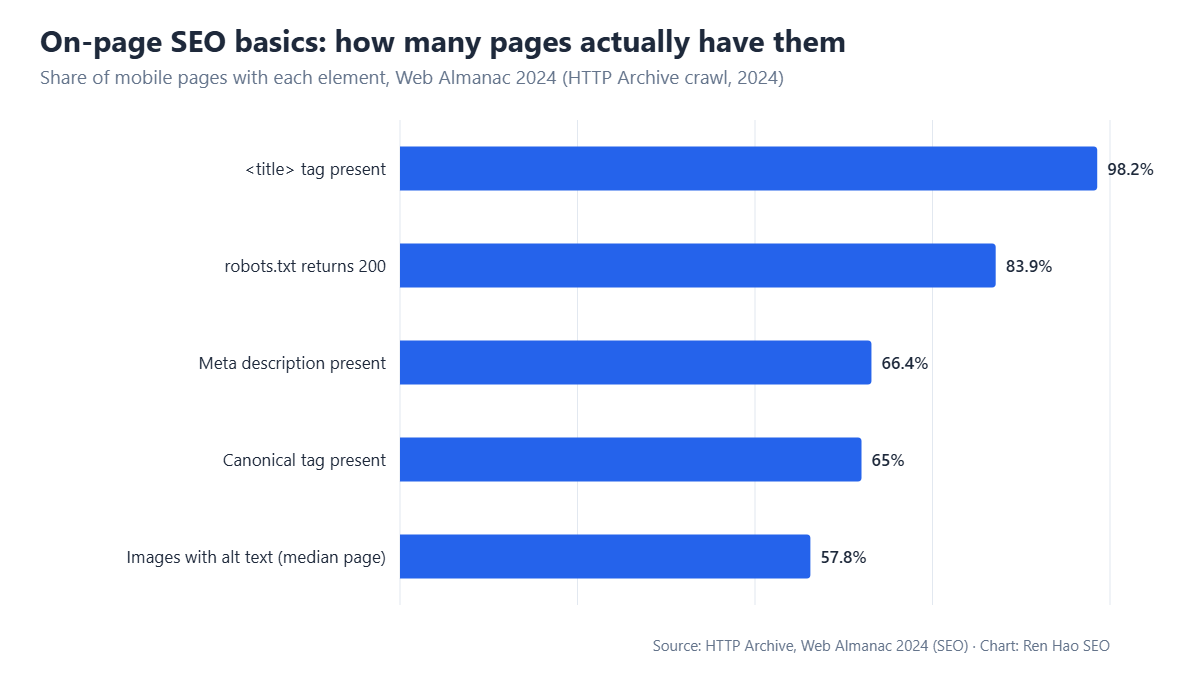
Aim for roughly 150 to 160 characters. State what the visitor will get, include the main query naturally, since Google bolds matching words, and end with a reason to act. Write one for each important page; HTTP Archive’s 2024 data shows about a third of pages still have none.
For the plumber above: “Burst pipe or no hot water? Our Leeds plumbers arrive within the hour, day or night, with fixed prices agreed before work starts. Call now.” The description answers the searcher’s worry, makes a specific promise and asks for the call.
Step 4: Use a short, descriptive URL
A URL should tell a person what the page is about before they open it. Keep it short, use lowercase words separated by hyphens and include the main topic: /services/emergency-plumber-leeds/ reads clearly; /page?id=4827 does not.
Organise URLs in folders that reflect your site’s structure, such as /services/, /blog/ or /locations/. Leave dates and filler words out unless they matter.
One caution: do not change the URL of an existing page for a small gain. If you must change one, redirect the old address to the new one with a 301 and update your internal links.
Step 5: Structure the page with headings
Headings are the outline of your page. Readers scan them to decide whether to stay, and search engines use them to understand what each section covers.
Use one H1 that states the topic of the page, usually close to the title tag. Use H2 headings for the main sections and H3 headings for points within them, in order. Write headings that describe the content in plain words, and phrase some as the questions customers ask; those sections are often the ones Google lifts into featured answers.
A simple check: read only the headings from top to bottom. If they tell the whole story of the page, the structure is sound.
Step 6: Write content that fully answers the search
This step decides most rankings. Google’s systems are designed to surface content that is helpful, reliable and written for people, and the best on-page tactics cannot rescue a page with nothing to say.
Lead with the answer
State the main point in the first paragraph and use the main query naturally within the first hundred words or so. Visitors should know at once that they are in the right place.
Cover the topic, in your own words
List the questions a customer has about the subject and answer each one. Look at what ranking pages cover, then add what they lack: your process, your prices, your data, your examples. Content that brings something new has an advantage over content that restates the same points; our guide to information gain explains why.
Use natural language around the topic
A page about a keto diet will naturally mention carbohydrates, meal plans and ketosis. Related terms help search engines confirm the subject. Write about the topic thoroughly and they will appear by themselves. Repeating the main keyword unnaturally makes a page harder to read and can count against it.
Make it easy to read
Use short paragraphs, plain words, lists for steps and options, and tables for comparisons. Add images or diagrams where they explain something faster than text. Write as you would speak to a customer.
Show who is speaking
Name the author, state their experience and cite sources for facts and figures. These signals matter most on topics involving health, money or safety. Our E-E-A-T guide covers how to present them.
Step 7: Optimise your images
Images help readers and can bring visitors through image search, but they are also the most common cause of slow pages. HTTP Archive’s data shows that about four in ten images still lack alt text.
- File name: describe the image, as in emergency-plumber-repairing-boiler.jpg in place of IMG_4827.jpg.
- Alt text: a short, accurate description for people using screen readers and for search engines. Include the topic where it fits naturally.
- Size and format: resize images to the dimensions at which they are displayed, compress them and use a modern format such as WebP or AVIF.
- Loading: lazy-load images below the first screen and set width and height so the layout does not shift.
- Relevance: use your own photographs of real work wherever you can.
Step 8: Add internal and external links
Internal links connect your pages. They help visitors find the next useful thing, and they tell search engines which pages matter and how they relate.
From each new page, link to the related service, product or guide a reader would want next, and link to the new page from existing relevant pages. Use anchor text that describes the destination, such as “our boiler repair prices”, in place of “click here”. Make sure your most important pages receive the most internal links. Our internal linking guide sets out a method for planning them.
External links have a place too. Linking to a primary source for a statistic or a regulation supports your accuracy and helps the reader. Link to sources you would be happy to be associated with.
Step 9: Add structured data
Structured data, also called schema markup, is code that labels the content of a page for search engines: this is a product with this price, this is a local business with these opening hours, this is an article by this author.
It can make a page eligible for enhanced results such as review stars, prices and breadcrumbs, and it helps search and AI systems interpret your content accurately. Choose the types that match the page, such as Organization, LocalBusiness, Product, Article or BreadcrumbList. Mark up only what is visible on the page, and validate it with Google’s Rich Results Test. Our structured data guide lists the types worth adding.
Step 10: Check the page experience
A page that reads well still has to load quickly and work on a phone. Google measures this through Core Web Vitals: the main content should appear within 2.5 seconds, the page should respond to interaction within 200 milliseconds and the layout should stay stable while loading.
Test the page in PageSpeed Insights and on a real phone. The usual fixes are compressing images, removing unused scripts and avoiding pop-ups that cover the content. For the detail, see how site speed affects rankings and conversions and our guide to user experience and engagement.
Step 11: Measure, refresh and improve
Publishing is the midpoint. Google Search Console shows which queries each page appears for, its average position and how often it is clicked.
Look for three patterns. A page with many impressions and few clicks needs a better title and description. A page ranking between positions 5 and 15 for a valuable query is close; improve its depth, add internal links and review its title. A page appearing for queries it does not answer well shows you a section to add or a new page to write.
Change one thing at a time and compare the following four weeks with the previous four. Review important pages at least twice a year: update figures, examples and dates, and show when the page was last reviewed. Our walkthrough of Google Search Console explains the reports.
On-page SEO and AI answers
Google’s AI Overviews and assistants such as ChatGPT now answer many questions directly, drawing on pages they judge clear and reliable. The on-page practices in this guide are the same ones that make a page easy for those systems to quote: a direct answer near the top, descriptive headings, specific facts with sources, named authors and valid structured data.
You do not need a separate method for AI search. Write each section so that it could stand alone as a complete answer to the question in its heading, and keep your facts current. A page that a person can scan and trust in thirty seconds is a page a machine can summarise accurately.
A worked example
Take a real case: an accountancy firm with a page titled “Our Services” that receives almost no search visits.
The firm chooses one query its clients use, “small business tax accountant” with its city, and confirms that the results are service pages from local firms. It rewrites the title as “Small Business Tax Accountant in Bristol: Fixed Monthly Fees”, and the description to state what is included and how quickly a new client can start. The URL becomes /services/small-business-tax-accountant/, with a redirect from the old address.
On the page, the H1 repeats the promise. The opening paragraph says who the service is for and what it costs. H2 sections answer the questions prospects ask on the phone: what is included, how the handover from a previous accountant works, which software the firm supports, and what happens at year end. The partner who leads the service is named, with qualifications. Two client results and three reviews sit beside the enquiry form. Photographs of the team replace the stock image, each with descriptive alt text. The page links to the firm’s guides on allowable expenses, and those guides link back.
Nothing in that list required new expertise. The firm already knew every answer. On-page SEO put that knowledge where a searcher, and Google, could find it.
On-page SEO checklist
- ✓One main query, matched to intentThe page is the right type for what searchers want, and no other page on your site targets the same phrase.
- ✓Title tagUnique, main query near the start, a clear reason to click, about 50 to 60 characters.
- ✓Meta descriptionUnique, about 150 to 160 characters, a specific benefit and a call to action.
- ✓URLShort, descriptive, lowercase and hyphenated.
- ✓HeadingsOne H1, then logical H2 and H3 headings that describe each section.
- ✓OpeningThe answer and the main topic appear in the first paragraph.
- ✓ContentComplete, original, readable, with a named author and cited sources.
- ✓ImagesDescriptive file names and alt text, compressed, correctly sized.
- ✓LinksLinks out to related pages and sources, and links in from relevant existing pages.
- ✓Structured dataThe right types, valid, matching visible content.
- ✓Page experiencePasses Core Web Vitals and works well on a phone.
Mistakes that hold pages back
- Keyword stuffing: repeating a phrase unnaturally. Write for the reader and cover the topic.
- Duplicate titles and descriptions: the same tag on many pages. Each page needs its own.
- Generic titles: “Home” or “Services” wastes your most valuable line.
- Thin pages: a few sentences that answer nothing. Expand them or merge them.
- Ignoring mobile: checking the page only on a desktop screen.
- Publishing and forgetting: never returning to see how a page performs.
If you recognise several of these on your own site, our triage guide to fixing common SEO errors sets out an order for dealing with them. And if you would like an expert review, a free SEO audit shows which pages would gain most from on-page work.
The primary sources for this guide: Google’s SEO Starter Guide; Google’s documentation on title links and snippets and meta descriptions; and the HTTP Archive Web Almanac 2024, SEO chapter for the adoption figures in the chart.
Written by the Ren Hao SEO team and reviewed by Ren Hao, founder and lead SEO strategist. Our guidance comes from real client work — over 100 SEO audits and $1,500,000+ in client sales value generated with white-hat, data-driven methods — not recycled theory.