CDN Guide for Small Sites: Free vs Paid Options
When a free CDN tier is enough, the three thresholds where it stops being enough, and how to set one up without breaking canonical URLs, hreflang or cached errors.
- Free CDN tiers cover static asset caching, TLS and basic DDoS absorption — enough for most single-market sites under ~50,000 visits.
- Upgrade for a measured need: edge image optimization, full-page caching for dynamic sites, or region control for international traffic.
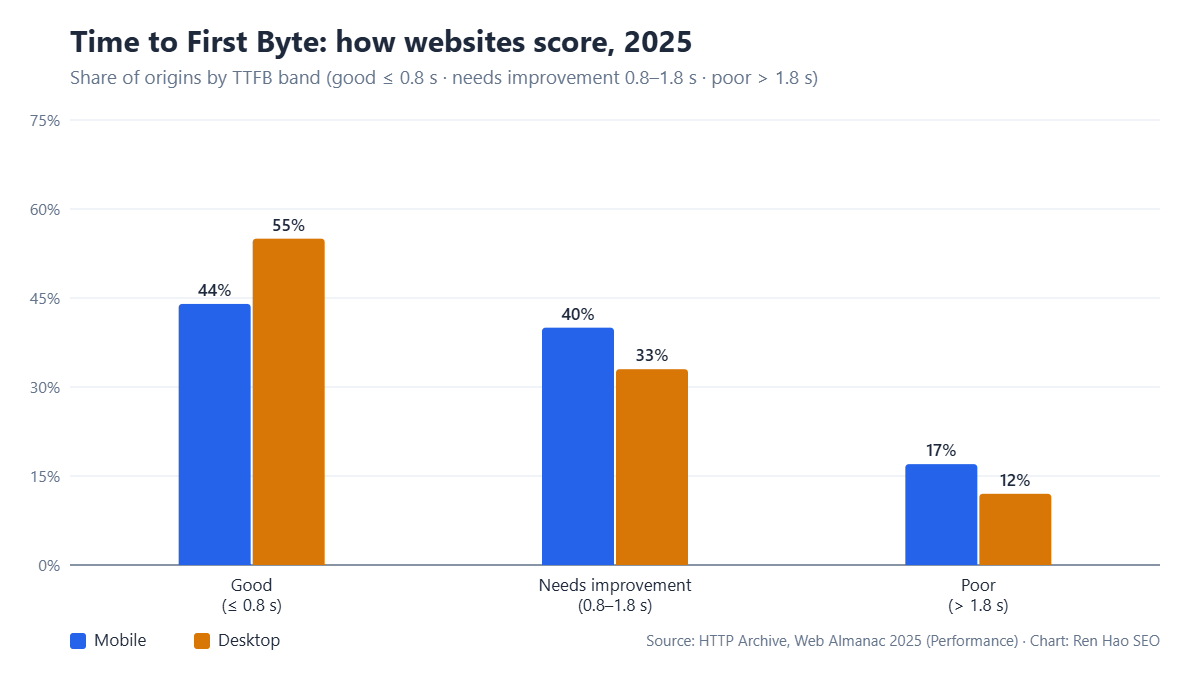
- Only 44% of mobile origins deliver a first byte within 0.8 s; a CDN removes the distance term of TTFB but not a slow origin.
- Most CDN ranking problems are configuration: cached errors, canonical tags on CDN hostnames, geo-redirects blocking crawlers.
- Price the decision in revenue: for international stores a paid tier usually pays back in weeks; for local brochure sites it rarely pays at all.
Does a small site need a CDN at all?
A small site needs a CDN when a meaningful share of its visitors are far from its server, when its images and scripts dominate page weight, or when its host cannot absorb traffic spikes. For a business serving one city from a server in that country, a CDN changes little; for a site selling to buyers in three countries from one shared server, it is the single cheapest performance fix available. The decision is geographic and traffic-shaped before it is technical.
The chart above sets the baseline. Only 44% of mobile origins in the 2025 Web Almanac deliver a first byte within 0.8 seconds. A CDN does not fix the origin — a slow PHP stack is still slow behind an edge — but it removes the distance component of Time to First Byte for cached pages and assets, which for international visitors is often the larger half. Google’s web.dev guidance on TTFB recommends a CDN as a first-line fix for exactly that reason.
Small sites under roughly 50,000 monthly page views can get most of the benefit from a free tier. The question this guide answers is when the free tier stops being enough, and which paid features are worth paying for versus which are sold on fear.
What free CDN tiers actually give you
Free CDN plans from Cloudflare, Bunny’s trial, jsDelivr for open-source assets, and the CDN bundled with many hosts all provide the core service: edge caching of static assets, TLS termination, HTTP/2 or HTTP/3, and basic DDoS absorption. For a WordPress brochure site or a small store that is enough to cut asset delivery time for distant visitors by half or more, and it costs nothing beyond the setup hour.
What free tiers typically withhold falls into four groups. Full-page HTML caching with reliable purge control, so dynamic pages still hit the origin on every request. Image optimization at the edge — automatic WebP or AVIF conversion, resizing by device — which is where most of the remaining page-weight savings live. Region selection and tiered caching, so you cannot control which edge serves which market. And logs, analytics and support beyond community forums, which matter the first time something breaks at 2 a.m. in a customer’s time zone.
| Feature | Typical free tier | Typical paid tier ($10–60/month) | Matters for SEO when |
|---|---|---|---|
| Static asset caching | Yes | Yes, with longer TTLs and tiered cache | Always — images and scripts are most of LCP |
| Full-page HTML caching | Limited or rules-based | Yes, with tag/URL purge and bypass rules | Content sites with international traffic |
| Image optimization at the edge | No | WebP/AVIF, resize, lazy variants | Image-heavy stores and portfolios |
| Edge region control | No | Choose or exclude regions, tiered origins | Selling into markets far from the origin |
| DDoS / bot protection | Basic | Rate limiting, bot scoring, WAF rules | Any site with a checkout or lead form |
| Logs and real-user analytics | Minimal | Per-request logs, RUM, cache-hit reporting | Diagnosing CWV field data by country |
| Support | Community | Email or chat with SLA | Every outage costs revenue |
Where the free tier stops being enough
The free tier stops being enough at one of three thresholds, and they arrive in a predictable order. The first is image weight: once product or portfolio images push LCP past 2.5 seconds on mobile for real users, edge image optimization is the fastest fix and it is almost never free. The second is dynamic content: a store or membership site where most pages are uncacheable at the HTML level gains little from static caching alone, and the paid full-page caching with smart bypass rules is what moves TTFB. The third is market spread: when Search Console shows meaningful impressions from a region the free edge network serves poorly, region control becomes a ranking input.
Note what is not on the list. Traffic volume alone rarely forces an upgrade; free tiers handle far more than a small business site sends. Bandwidth overage is a real cost on some providers, but for most sites it is a rounding error. Buy the paid tier for the feature you have measured a need for, not for a plan name.
For a site on a cheap shared hosting plan, the paid CDN tier is often a better spend than upgrading the host, because it removes load from the origin as well as distance from the visitor. The shared versus VPS decision changes once the CDN is doing the static work.
CDN choice and international SEO
For a site targeting several countries, the CDN is part of the international SEO architecture rather than a performance add-on. Core Web Vitals are assessed from field data by real users in each market, and Google reports them in the Chrome UX Report per origin, so a site that is fast in its home country and slow for buyers abroad carries that penalty in the market where it is trying to grow. Edge caching close to those users is the only practical way to change the distance term for a single-origin site.
The interaction with hreflang and localized URLs is straightforward as long as the CDN does not rewrite them. Check that the edge serves each country URL with its own cached copy — cache keys must include the full path, not just the host — and that any geo-redirect at the edge is disabled for crawlers. Edge-level country redirects are the most common way we see international sites block Googlebot from the localized versions they built. Our international SEO service audits CDN configuration alongside hreflang for exactly this reason, and server location versus CDN covers the ranking side in detail.
Setting up a CDN without breaking SEO
Most CDN-related ranking problems are configuration, not the CDN. The failure cases repeat: cached 404 or redirect responses that persist after a fix, canonical tags pointing at a CDN hostname, image URLs that change so alt text and structured data reference the old paths, and edge caching of logged-in or personalized HTML served to crawlers. Every one of these is avoidable with a checklist applied at setup and after each configuration change.
- 1Put the CDN in front of the canonical hostnameServe the site through the CDN on the same domain. Do not create a separate cdn.example.com for pages; use it for assets only if at all, and keep canonical tags on the primary domain.
- 2Cache assets aggressively, HTML carefullySet long TTLs for images, CSS and JS with versioned filenames. Cache HTML only for pages that are identical for every visitor, and bypass cache on cookies that indicate a session or cart.
- 3Preserve the URL structureImage and script paths should not change. If you enable edge image optimization, make sure it rewrites on the fly rather than moving files, so schema, sitemaps and alt attributes remain valid.
- 4Disable geo-redirects for crawlersIf the edge redirects visitors by country, exempt search engine user agents and keep hreflang as the signal. Verify with the URL Inspection tool from each market.
- 5Purge on publish and on fixConnect the CMS to the CDN purge API so a corrected page, redirect or removed URL is refreshed at the edge immediately; cached errors are the most common post-migration ranking loss.
- 6Verify with field data, not just lab testsCheck the Chrome UX Report or Search Console Core Web Vitals per country after two to four weeks. Lab tests from one location will not show what the CDN changed for distant users.
A cost model for the decision
Price the decision in revenue rather than in plan fees. A site with 30,000 monthly visits, a 2% conversion rate and a $90 average order earns $54,000 a month. If a paid CDN tier moves mobile LCP from 3.4 to 2.2 seconds for the 40% of visitors abroad and lifts their conversion by even a quarter of a point, that is roughly $1,000 a month against a $40 plan. The eCommerce case study on this site shows the pattern at a larger scale: performance work on the delivery layer reduced acquisition cost because paid and organic visitors converted at a higher rate after the change.
The reverse case is just as real. A local services site with 4,000 monthly visits, all from one metro area, on a host with its own caching layer, gains nothing measurable from a paid CDN and might lose an hour a month to configuration. The free tier for TLS and DDoS absorption is enough; spend the money on the hosting characteristics that affect SEO instead.
Our recommendation by site type
- Brochure site, one market, under 20,000 visits: free tier, assets only, keep HTML on the host’s cache.
- Content site with international readers: paid tier with full-page caching and region control; this is where TTFB by country becomes a ranking factor.
- Small store with heavy imagery: paid tier chosen for edge image optimization first; bandwidth is secondary.
- Store or lead-gen site with a checkout or form: paid tier for rate limiting and WAF rules, regardless of traffic, because a single bot wave costs more than a year of the plan.
- Any site on shared hosting with load problems: paid CDN before a host upgrade; test for 30 days and measure origin load.
Whatever the tier, revisit the decision when the site’s market mix changes. The TTFB benchmark data we publish shows that distance, not raw server speed, is the largest variable for international visitors — and distance is the one thing a CDN is built to remove.
TTFB distribution: HTTP Archive Web Almanac 2025 (chart above). CDN guidance: web.dev — Time to First Byte and Google Search Central — Core Web Vitals. Feature comparisons reflect published plan pages as of September 2026 and change frequently; check the provider before deciding. Revenue examples are illustrative models, not client data.