Ecommerce Hosting: PCI, Speed & Scaling for Sales Peaks
How to host a WooCommerce or Magento store so that card data stays out of scope, uncacheable cart and checkout pages stay fast, and the origin holds when a launch sends fifty times normal traffic to the checkout.
- Ecommerce hosting has three jobs ordinary hosting does not: PCI-safe card handling, fast uncacheable cart and checkout pages, and surviving sales peaks.
- Tokenised or hosted checkout keeps card data off your server and most of the PCI DSS 4.0 burden off your host; a checkout Content Security Policy is now baseline.
- Size hosting on p95 TTFB for a logged-in cart request under peak concurrency — PHP workers and database connections fail before bandwidth ever does.
- Shared hosting fits tiny tokenised stores; managed VPS suits predictable peaks; cloud suits volatile peaks with engineering capacity; managed platforms trade control for convenience.
- Pre-warm, protect, degrade gracefully, monitor and rehearse: the stores that fail on their biggest day were never load-tested on the peak configuration.
What ecommerce hosting has to do that ordinary hosting does not
Ecommerce hosting has three jobs a brochure site never asks of a server: it has to hold card data out of scope or protect it to PCI DSS standard, it has to keep server response fast when every request is a personalised, uncacheable cart or checkout page, and it has to absorb a sales peak that can be ten to fifty times normal traffic without falling over. A host that does two of the three is a liability, because the third failure always arrives on the day it costs the most.
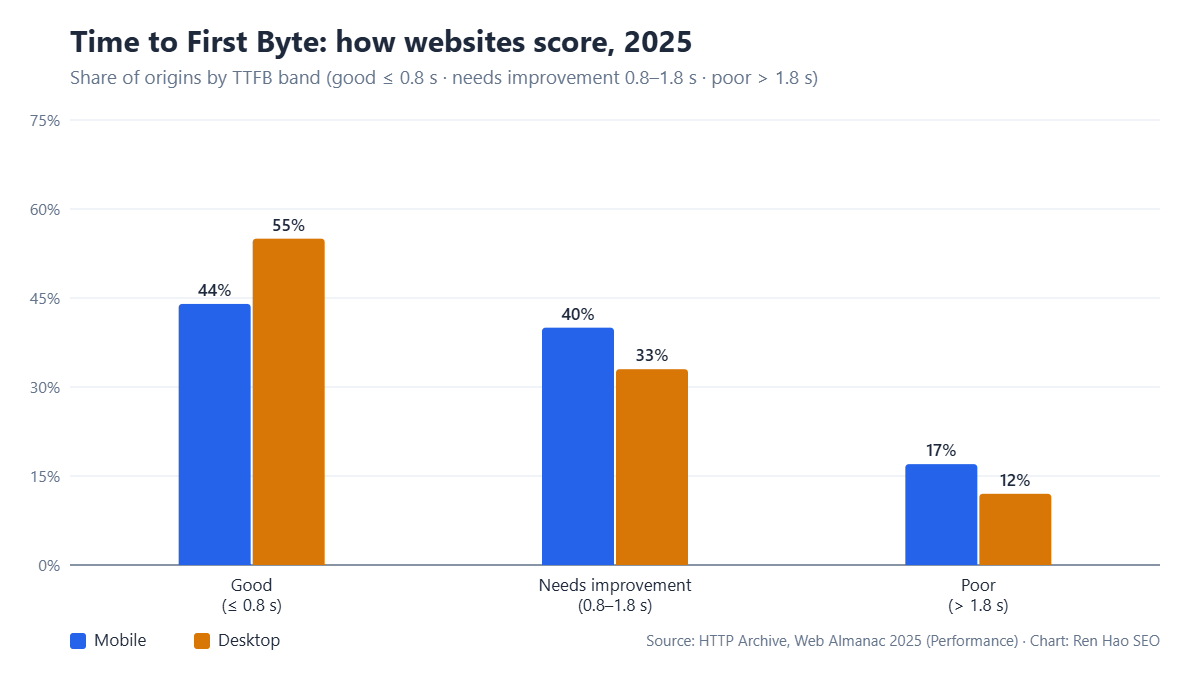
The reason ordinary hosting advice fails for stores is caching. A content site can be served almost entirely from a full-page cache and a CDN, so a slow origin is masked. A store cannot cache the cart, the checkout, the account area, personalised pricing, live stock or anything behind a login. Those pages hit PHP and the database on every request, which means the origin server's real capacity — CPU, PHP workers, database connections — is exposed exactly when a promotion sends thousands of buyers to the checkout at once. The chart above is the web-wide picture: barely half of sites deliver a first byte within 0.8 seconds on desktop, and under peak load an undersized store origin is nowhere near that.
The commercial stakes are direct. Google's Core Web Vitals thresholds treat 800 ms TTFB as the boundary of "good", and Largest Contentful Paint cannot be fast if the first byte is slow. Beyond rankings, checkout abandonment climbs with every second of delay, and a cart page that times out during a launch is revenue that does not come back. When we scope hosting for a store we therefore work backwards from the peak: what is the largest number of concurrent checkouts this business will see in the next twelve months, and what does the origin need to serve that at under one second?
This article covers the three requirements in turn — PCI scope and security, speed for uncacheable pages, and scaling for peaks — and ends with a decision framework for shared, VPS, cloud and managed platforms. It assumes WooCommerce, Magento or a self-hosted stack; Shopify and other hosted platforms remove most of the hosting decision but not the performance one.
PCI DSS: keep card data out of scope, then secure what is left
The single most important PCI decision is architectural: never let card numbers touch your server. Use a payment gateway that tokenises card data in the buyer's browser (hosted fields, redirect or iframe checkout) so your site only ever handles a token. That moves most stores into the simplest self-assessment category and removes the need for the hosting provider to be a certified PCI environment. Merchants who accept card data on their own forms and pass it to a processor inherit the full weight of the standard and the host has to match it.
PCI DSS version 4.0 became mandatory in March 2024, and its future-dated requirements — including client-side script integrity on payment pages and stronger authentication — took effect on 31 March 2025. In practice that means the hosting and platform layer must support four things: TLS 1.2 or higher with modern ciphers on every page, not just checkout; a web application firewall in front of the store; file-integrity and malware scanning that actually runs; and logging you can retrieve if your acquirer asks. The official PCI Security Standards Council publishes the current self-assessment questionnaires, and the gateway's own documentation will tell you which one applies to your integration.
Two hosting details get missed. First, script injection on the checkout page is the most common modern card-skimming attack (Magecart-style), and it does not need to compromise your server — a third-party script you loaded is enough. A Content Security Policy that restricts which domains can execute on checkout, and a host that lets you set headers per path, is now a baseline. Second, shared hosting is not automatically disqualified for a tokenised store, but a shared environment where another tenant's compromised site can reach your files is. Ask the host how accounts are isolated (CageFS or equivalent on cPanel, container isolation on cloud) before assuming the cheapest tier is acceptable.
- ✓Tokenised or hosted checkoutCard data never touches your server; confirm the gateway integration type and the SAQ it maps to.
- ✓TLS everywhere with HSTSModern ciphers, HTTP/2 or HTTP/3, no mixed content; renew automatically.
- ✓WAF and malware scanningA real web application firewall (host-level or Cloudflare) plus scheduled file-integrity scans with alerts.
- ✓Checkout script controlContent Security Policy on payment pages; inventory every third-party script that loads at checkout.
- ✓Account isolationOn shared hosting, verify per-account isolation; on VPS/cloud, verify the tenant boundary is the whole machine or container.
- ✓Retrievable logs and backupsAccess logs, error logs and daily off-server backups you can restore yourself without a ticket.
Speed for the pages you cannot cache
Ecommerce speed is decided by the uncacheable pages, so the metric to size hosting on is origin response time for a logged-in cart request under concurrent load — not the cached home page score a sales engineer will show you. On a shared server with a handful of PHP workers, ten simultaneous checkouts queue behind each other and every one of them waits. On a properly sized origin, PHP workers, opcode cache, object cache and database tuning together decide whether a cart page returns in 300 ms or 3 seconds.
The stack that consistently delivers for WooCommerce and Magento stores looks like this: a persistent object cache (Redis) so product, session and cart lookups do not hit MySQL repeatedly; PHP-FPM or LiteSpeed with enough workers for peak concurrency rather than the default; a full-page cache with correct exclusions for cart, checkout, account and any page that reads cookies; a CDN for static assets and cacheable category pages; and a database on SSD/NVMe with query caching and slow-query logging turned on. Our earlier breakdown of how server configuration drives Core Web Vitals covers the origin side in depth; the ecommerce-specific point is that the exclusions and the worker count matter more than the raw CPU clock.
Measure it properly. Use a load-testing tool to simulate realistic sessions — browse a category, open a product, add to cart, start checkout — at your expected peak concurrency, and watch p95 TTFB on the cart and checkout steps. A store that is fast at one user and collapses at fifty is common, and the collapse point is what tells you whether the current plan is adequate. Chrome UX Report field data in Search Console will show you the same thing after the fact, which is too late for a launch.
One more variable is location. If most buyers are in one country, the origin should be there or within one network hop; a CDN cannot fix a slow uncacheable request to an origin on another continent. For stores selling across several markets, the decision is between multiple origins, an edge platform that runs checkout logic close to the buyer, or accepting a slower far-market checkout and compensating with everything else.
Scaling for sales peaks: what actually breaks first
Under a real peak, the order of failure is almost always the same: PHP worker exhaustion first, then database connection limits, then memory, and only rarely bandwidth. Knowing that order tells you where to spend. Doubling bandwidth does nothing if the site has eight PHP workers and eighty people trying to check out; adding workers without a matching database connection pool just moves the queue one layer down.
Three scaling models exist. Vertical scaling — a bigger VPS or dedicated server — is the simplest and is enough for most stores whose peaks are predictable and under a few hundred concurrent buyers; you pay for capacity all year and resize before known events. Horizontal scaling on cloud platforms adds application servers behind a load balancer with a shared database and cache, which handles larger and less predictable peaks but requires the application to be stateless (sessions in Redis, uploads on object storage) and costs engineering time to set up correctly. Managed ecommerce platforms handle scaling for you at a premium and remove most of the tuning, at the cost of flexibility and, sometimes, control over caching rules.
Whichever model you use, a peak plan has five parts. Pre-warm: fill caches for every category and product page before the event starts so the first wave hits cache, not PHP. Protect: rate-limit bots and known scrapers at the edge so they do not consume the workers real buyers need. Degrade gracefully: have a queue page or a "high demand" mode that keeps checkout alive by switching off recommendation widgets, live search and non-essential integrations. Monitor: real-time dashboards for worker saturation, database connections and error rates, with someone actually watching. Rehearse: run the load test against the peak configuration, not the everyday one, at least a week before.
- 1Size for the peak, not the averageEstimate maximum concurrent checkouts for the next twelve months and load-test the current origin against it.
- 2Fix the queue layer firstRaise PHP workers and database connections together; add Redis for sessions and object cache before buying CPU.
- 3Push everything cacheable to the edgeStatic assets, category and product pages on a CDN with correct exclusions; keep cart and checkout on the origin.
- 4Build a degrade modeA single switch that disables non-essential widgets and integrations at checkout when worker saturation passes 80%.
- 5Rehearse the peakPre-warm caches, run the full load test on the peak configuration, and confirm alerts reach a person.
Shared, VPS, cloud or managed: matching the plan to the store
Shared hosting is adequate for a tokenised store with low traffic, a small catalogue and no meaningful peaks — a business doing a handful of orders a day with no launches. It stops being adequate the moment concurrent checkouts exceed what a few PHP workers can serve, or when a neighbour's traffic starts affecting your TTFB. Our guide to when to move from shared to VPS to cloud sets out the general thresholds; for stores the trigger comes earlier because the uncacheable share of traffic is higher.
A managed VPS or dedicated server is the sweet spot for most small and mid-sized stores: predictable cost, root-level control over PHP, caching and database settings, and enough headroom for seasonal peaks if you resize ahead of them. Cloud infrastructure suits stores with volatile or very large peaks and an engineering team (or partner) able to run a stateless application tier. Managed ecommerce platforms — from WooCommerce-specialist hosts to Magento cloud offerings — suit businesses that would rather pay a premium than own the tuning, provided you check that their caching rules and PCI responsibilities are documented in writing.
| Plan type | Fits when | Watch for | Typical failure at peak |
|---|---|---|---|
| Shared | Few orders/day, tokenised checkout, no launches | Neighbour load, low worker count, weak isolation | PHP queue; checkout timeouts |
| Managed VPS / dedicated | Predictable peaks under a few hundred concurrent buyers | Resize before known events; verify backups | Under-provisioned DB connections |
| Cloud (horizontal) | Large or unpredictable peaks; engineering capacity available | Stateless app tier, shared cache, cost control | Misconfigured session or cache sharing |
| Managed ecommerce platform | Want scaling and PCI handled; accept premium and constraints | Caching exclusions, script control, exit terms | Vendor-side limits you cannot tune |
Cost should be evaluated against revenue at risk, not against the cheapest plan. A store taking meaningful revenue on launch days is comparing a few hundred a month of hosting against the value of the orders that would have failed. That is also why we treat hosting as part of the build in our ecommerce web design projects: the platform, caching rules and origin sizing are decided with the catalogue and checkout, not bolted on afterwards.
A store owner's hosting due-diligence list
Before signing with any host or platform, get written answers to a short list of questions. Most sales conversations avoid them, and the answers separate providers who have run stores under load from those who have not.
- How many PHP workers (or equivalent) does the plan include, and what happens when they are all busy?
- Is a persistent object cache (Redis or Memcached) included, and is it per-account or shared?
- Which paths are excluded from full-page caching by default, and can we set exclusions and headers per path?
- What is the database connection limit, and is the database on the same host or separate?
- How are accounts isolated from each other on shared plans? Which WAF is in front of the store?
- What is the documented process and time to resize before a known peak, and can we do it ourselves?
- Where are backups stored, how often are they taken, and can we restore a single file or table without a ticket?
- Which PCI responsibilities does the host accept in writing, and which remain ours?
If a provider cannot answer the worker and cache questions specifically, assume the plan is a content-hosting plan with an ecommerce label. If they cannot answer the PCI responsibility question in writing, assume every responsibility is yours. Neither is disqualifying for a very small store, but both are for one that depends on peaks.
For a business at the small end, the small-business hosting options we have compared cover several plans that pass this list on a modest budget. For a business with real peaks, the comparison changes: the question is no longer price per month but whether the origin holds at the concurrency your best day will bring.
Putting it together: a reference architecture
For a WooCommerce or Magento store doing meaningful volume, the architecture we recommend is deliberately boring. A managed VPS or a small cloud instance sized for peak PHP concurrency, with NVMe storage and the database either on the same well-provisioned host or on a managed database service. Redis for sessions and object cache. A full-page cache (LiteSpeed, Varnish or the platform's equivalent) with cart, checkout, account and any cookie-dependent page excluded. A CDN in front for static assets, images in modern formats, and cacheable category pages. TLS terminated at the edge and the origin. A WAF at the edge with bot rate-limiting rules tuned before each campaign. Daily off-server backups with tested restores. Monitoring on worker saturation, database connections, error rate and p95 checkout TTFB.
Tokenised checkout keeps the whole stack out of full PCI scope, a Content Security Policy on checkout limits what a compromised third-party script can do, and a degrade switch keeps orders flowing if a peak exceeds the plan. None of this is exotic. The stores that fail on their biggest day are not usually on bad hosting; they are on hosting that was never sized for uncacheable traffic and never rehearsed.
PCI Security Standards Council: PCI DSS standards and self-assessment questionnaires. Google: Time to First Byte (TTFB) on web.dev and Core Web Vitals in Search Central. HTTP Archive: Web Almanac 2025, Performance chapter.
The jewellery store in our case study is the practical illustration of why this matters: product and category architecture drove the organic growth, and a catalogue where stock and prices change constantly only converts that traffic if the uncacheable pages stay fast when buyers arrive in bursts.