
Core Web Vitals: The Complete 2026 Guide to Passing Them
Core Web Vitals are among the most misunderstood ranking factors in SEO — equal parts genuinely important and badly over-stressed. Some businesses ignore them entirely and quietly leak rankings and conversions; others obsess over a perfect score while neglecting the content and authority that actually decide whether they rank at all. This complete guide cuts through the confusion. We will explain exactly what each metric measures, how much they really affect your rankings and your revenue, and — most importantly — a practical, prioritised, field-tested process for fixing each one. Everything here comes from diagnosing and fixing performance on real client sites across SaaS, eCommerce and fintech, not from theory.
- Core Web Vitals — LCP (loading), INP (responsiveness), CLS (visual stability) — measure real-user experience.
- Google ranks on field data (real users), not lab scores; optimise for field, debug with lab.
- They’re a genuine but minor ranking tie-breaker — and a much larger conversion factor, especially on mobile.
- Fix LCP with images and server response, INP with leaner JavaScript, CLS by reserving space for media.
- Prioritise by failing template; fix the template once to fix thousands of pages.
- Don’t chase a perfect lab score or treat Core Web Vitals as all of SEO — content and authority still decide rankings.
What Core Web Vitals actually are
Core Web Vitals are Google’s attempt to put real numbers on something that used to be vague: how good or bad your pages feel to actual users. Rather than relying on a single, gameable ‘page speed’ score, Google measures three specific, complementary dimensions of experience — how quickly the main content loads, how quickly the page responds when you interact with it, and how visually stable it is while it loads. Together these form the Core Web Vitals, which sit inside Google’s broader ‘page experience’ signals alongside HTTPS and mobile-friendliness.
One dimension deserves its own deep dive: our guide to which Core Web Vitals problems hosting can fix — with 90-day benchmark data across twelve server configurations — separates the metrics your server owns from the ones your code owns.
The three metrics are Largest Contentful Paint (LCP), which captures loading performance; Interaction to Next Paint (INP), which captures responsiveness to user input throughout the visit; and Cumulative Layout Shift (CLS), which captures visual stability. Each targets a distinct, real frustration: waiting for content to appear, tapping something that doesn’t respond, and reaching for a button that jumps away as the page loads. If you have ever felt any of those, you have felt a failing Core Web Vital.
Crucially, Core Web Vitals are measured from real users, not just a lab test. Google collects the data through the Chrome User Experience Report (CrUX), which aggregates the experience of real Chrome visitors to your site over a rolling 28-day window. This is why two sites with identical lab scores can have very different Core Web Vitals: what matters is how the page performs on your actual visitors’ real devices and connections, not on a fast machine with fibre internet. It also means improvements take time to show up in your scores, because the 28-day window has to catch up.
Field data vs lab data: why your scores might disagree
One of the most common sources of confusion is the difference between field data and lab data. Field data (also called Real User Monitoring, or RUM) is what Google actually uses for ranking: the CrUX data from real visitors. Lab data is a simulated test run in a controlled environment, such as Lighthouse or the lab section of PageSpeed Insights. Lab data is reproducible and great for debugging, but it is a simulation; field data is the truth that counts.
This distinction matters enormously in practice. You can score 100 in a Lighthouse lab test and still fail Core Web Vitals in the field, because your real users are on slower phones, weaker connections, or geographies far from your server. Conversely, you might fix an issue and see your lab score jump immediately while your field score takes weeks to improve, because the field data is a 28-day rolling average. When we audit a client’s performance, we always lead with field data from Search Console and CrUX, and use lab tools only to diagnose the cause.
The practical rule is simple: optimise for field data, debug with lab data. If Search Console says you are failing, you are failing, no matter what a single lab run shows. And if you fix something, give the field data a few weeks to reflect it before concluding the fix didn’t work.
How much do Core Web Vitals really affect rankings?
Here is the honest, data-grounded answer that many SEO articles avoid: Core Web Vitals are a real ranking factor, but a relatively minor tie-breaker compared to relevance, content quality and authority. Google has stated repeatedly that page experience is one signal among many, and that it will not promote mediocre content above genuinely more relevant, more authoritative results simply because the mediocre page loads faster. If your pages are not ranking at all, Core Web Vitals are rarely the primary culprit — and pouring weeks into a perfect score while ignoring weak content or a thin backlink profile is a classic misallocation of effort.
So why bother at all? Two reasons, and the second is the one most people underrate. First, Core Web Vitals act as a tie-breaker: when several pages are closely matched on relevance and authority — which is exactly the situation on competitive commercial terms — the better experience can be the deciding factor. Second, and more importantly, the conversion impact of Core Web Vitals is usually far larger and more immediate than the ranking impact. Slow, unstable, unresponsive pages lose visitors before they convert, especially on mobile where patience is thinnest. Google’s own research has repeatedly linked faster pages to lower bounce rates and higher conversions.
This reframing leads to far better decisions. The case for fixing Core Web Vitals is rarely ‘it will rocket us up the rankings.’ It is ‘it will stop us quietly leaking the traffic and conversions we already earn, and remove a tie-breaker disadvantage on the competitive terms where margins are thin.’ Framed that way, Core Web Vitals become a conversion investment with an SEO bonus — which is a much more compelling and accurate business case than chasing a green score for its own sake.
Largest Contentful Paint (LCP): fixing loading
Largest Contentful Paint measures how long it takes for the largest visible element in the viewport — usually a hero image, a large heading, or the main content block — to finish rendering. It is a proxy for the moment a user feels the page has ‘loaded.’ A good LCP is under 2.5 seconds; 2.5 to 4 seconds needs improvement; over 4 seconds is poor. LCP is the metric most sites struggle with most, and it is usually where the biggest, fastest wins live.
The most common causes of poor LCP, in roughly the order we see them in audits, are: slow server response time (the server takes too long to send the first byte), render-blocking CSS and JavaScript (the browser can’t paint until it finishes processing them), oversized or unoptimised images (especially the hero image, which is frequently the LCP element itself), and client-side rendering that delays the main content while JavaScript builds the page. Each has a clear fix.
For server response, the lever is often your hosting and caching. A slow Time To First Byte makes a good LCP nearly impossible regardless of front-end optimisation, which is exactly why hosting matters for SEO more than most people realise — we cover how to choose performance-grade hosting in our web hosting guide. Implement server-side caching, use a Content Delivery Network (CDN) to serve assets from locations near your users, and consider upgrading from cheap shared hosting if your server response is consistently slow.
For images, the wins are large and easy: serve your largest images in modern formats like WebP or AVIF, size them correctly for the device (don’t ship a 3000px image to a 400px-wide phone), compress them properly, and explicitly preload the LCP image so the browser fetches it early. For render-blocking resources, defer non-critical JavaScript, inline critical CSS and load the rest asynchronously, and audit your third-party scripts ruthlessly. And where you can, server-render your main content rather than building it client-side. In our experience, image optimisation and server response improvements account for the majority of LCP wins, and both are usually quick to implement.
Interaction to Next Paint (INP): fixing responsiveness
Interaction to Next Paint replaced First Input Delay (FID) as a Core Web Vital in March 2024, and it is a much more demanding metric. Where FID only measured the delay before the browser began processing your first interaction, INP measures the full latency — from interaction to the next visual update — across all interactions throughout the visit, and reports a value near the worst experience. In plain terms: INP measures how snappy your page feels every time the user taps, clicks or types, not just once. A good INP is under 200 milliseconds; 200 to 500 needs work; over 500 is poor.
Poor INP almost always comes from one root cause: too much JavaScript blocking the browser’s main thread. When the main thread is busy executing a long task, it cannot respond to the user, so taps and clicks feel laggy. The fixes therefore centre on reducing and breaking up JavaScript work. Break long tasks into smaller chunks so the browser can respond between them; defer or lazy-load non-critical scripts so they don’t compete for the main thread during interactions; and remove or replace heavy third-party scripts, which are frequent offenders — analytics, chat widgets, A/B-testing tools, ad tags and tag managers can each add significant main-thread work.
Beyond that, be disciplined about how much JavaScript your pages ship in the first place. Modern frameworks make it easy to send enormous bundles that look fine on a developer’s fast laptop but choke a mid-range phone. Code-split so each page only loads what it needs, audit your dependencies, and question whether every interactive feature genuinely earns its JavaScript cost. INP is the metric where front-end engineering discipline matters most, and where a heavy, feature-stuffed site pays the price in real-user frustration.
Cumulative Layout Shift (CLS): fixing visual stability
Cumulative Layout Shift measures how much the visible content of your page moves around unexpectedly as it loads. It is the metric behind the universal frustration of going to tap a button, only for an ad or image to load above it and shove everything down so you tap the wrong thing. CLS is scored as a decimal; a good score is under 0.1, 0.1 to 0.25 needs improvement, and over 0.25 is poor. Happily, CLS is usually the easiest of the three to fix, and most sites can reach a good score in a focused afternoon.
The fixes are mostly about reserving space. Always set explicit width and height attributes (or a CSS aspect-ratio) on images, videos and iframes, so the browser reserves the correct space before they load and nothing jumps. Reserve space for ads, embeds and any dynamically injected content rather than letting them push existing content around. Avoid inserting new content above content the user is already looking at, unless it’s in response to their own action. And be careful with web fonts: use font-display strategies that avoid large layout shifts when the custom font swaps in.
Because CLS is cheap to fix and directly affects how ‘broken’ a site feels, it is almost always worth doing early. A high CLS makes even a fast site feel amateurish, and it directly damages conversions because users misclick, lose their place, and lose trust. It is one of the clearest examples of how Core Web Vitals and conversion optimisation overlap.
A prioritised, data-driven process for passing Core Web Vitals
- 1Measure your real-world status firstOpen the Core Web Vitals report in Google Search Console. It uses field data and groups your URLs by status (good / needs improvement / poor) and by issue. This tells you what’s actually failing for real users — your starting point and your priority list.
- 2Identify the failing template, not just the pageMost sites fail on one or two page templates — product pages, blog posts, the homepage — rather than uniformly. Group URLs by template, find the worst offender, and fix the template once to fix thousands of pages at once.
- 3Diagnose the cause with lab toolsRun the failing template through PageSpeed Insights and Lighthouse to see which metric fails and why. The lab data points to the specific cause (large image, render-blocking script, layout shift source) so you fix the right thing.
- 4Fix highest-impact, lowest-effort firstUsually that means images and server response for LCP, heavy/third-party JavaScript for INP, and unsized media for CLS. Sequence by impact-over-effort rather than trying to fix everything at once.
- 5Re-measure and wait for the field dataAfter deploying fixes, confirm the improvement in lab data immediately, then give the field data (28-day rolling) a few weeks to catch up before judging success. Don’t panic-revert a good fix because the field score hasn’t moved yet.
- 6Monitor continuouslyPerformance regresses over time as new features, scripts and content are added. Treat Core Web Vitals as an ongoing discipline, not a one-off project — re-check Search Console monthly.
Common Core Web Vitals mistakes to avoid
The biggest mistake is chasing a perfect Lighthouse score instead of passing the field-data thresholds that actually matter. A score of 100 in the lab is irrelevant if real users on real phones still experience a slow, janky page — and the reverse is also true, so don’t panic over a lab score if your field data is green. Optimise for the real-user data Google actually ranks on.
The second mistake is treating Core Web Vitals as the whole of technical SEO, or even the whole of SEO. They are one part of technical SEO, which is itself one part of a complete strategy that also needs great content and genuine authority. We have seen businesses with perfect Core Web Vitals rank nowhere because their content didn’t match search intent, and businesses with mediocre scores rank beautifully because everything else was strong. Prioritise accordingly — this is the core lesson of why most SEO fails.
The third mistake is ignoring them entirely. Some businesses, having heard that Core Web Vitals are ‘a minor factor,’ dismiss them — and then wonder why their mobile conversions are poor and they keep losing close ranking battles. Minor as a ranking factor does not mean unimportant as a business factor. The sweet spot is to pass the thresholds, capture the conversion and tie-breaker benefits, and then move your energy to content and authority.
The tools you need to measure and debug Core Web Vitals
You do not need expensive software to manage Core Web Vitals well; the essential tools are free and come straight from Google. Google Search Console’s Core Web Vitals report is your source of truth, because it uses the same field data Google ranks on, grouped by URL and by issue across your whole site — start here every time. PageSpeed Insights combines field data (where available) with a lab test for a single URL, and is ideal for diagnosing a specific failing page. The Lighthouse panel in Chrome DevTools runs a lab audit on demand and is the workhorse for developers iterating on fixes.
Beyond the basics, the CrUX Dashboard and the Chrome UX Report on BigQuery let you analyse field data historically and compare against competitors, while the Web Vitals JavaScript library lets you measure real-user metrics directly in your own analytics for granular monitoring. For most businesses, though, Search Console plus PageSpeed Insights plus Lighthouse cover everything needed: Search Console tells you what’s failing for real users, PageSpeed Insights and Lighthouse tell you why, and Search Console again confirms when the fix has landed in the field. We cover the wider toolkit in our recommended SEO tools guide.
A word of caution on tools: do not let a single lab run dictate your priorities. We have seen teams burn days chasing a Lighthouse number that swings with every test, while the field data — the data that actually matters — sat green the whole time. Use lab tools to diagnose and verify causes, but let field data decide what is genuinely worth fixing.
Why mobile is where Core Web Vitals are won or lost
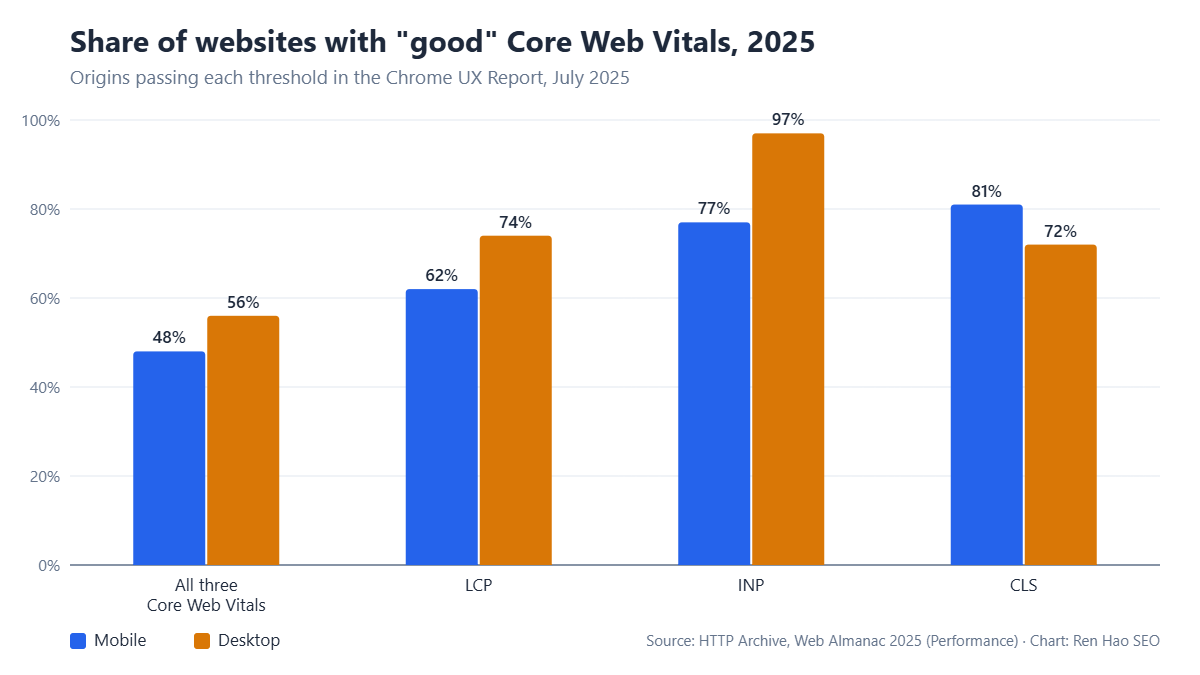
Google predominantly uses the mobile version of your site for indexing and ranking, and the majority of the field data that feeds your Core Web Vitals comes from mobile visitors. This has a profound practical implication that desktop-focused teams routinely miss: your Core Web Vitals are largely a mobile performance problem. A page that loads beautifully on a developer’s desktop with fibre internet can fail badly on a mid-range Android phone on a patchy connection — and that phone is what Google is measuring.
Mobile amplifies every weakness. Slower processors make heavy JavaScript far more punishing for INP. Smaller bandwidth makes oversized images far more punishing for LCP. Smaller screens make layout shifts far more disruptive for CLS and conversions. So when you test, always test under realistic mobile conditions — throttled CPU and network in Lighthouse, or better still, real mid-range devices — rather than on the fast hardware you happen to be developing on. Optimising for the fast case while your real users are on the slow case is one of the most common and costly mistakes in performance work.
This mobile-first reality is also why Core Web Vitals and conversions are so tightly linked for any business with significant mobile traffic. Mobile users are the least patient and the most likely to abandon a slow or janky experience, so fixing mobile Core Web Vitals frequently produces a measurable lift in mobile conversion rate — a direct revenue win quite separate from any ranking benefit, and exactly the kind of overlap our CRO service looks for.
Core Web Vitals on common platforms: WordPress, Shopify and custom builds
- The right fixes depend partly on what your site is built on, because each platform has characteristic Core Web Vitals strengths and weaknesses. On WordPress, the most common culprits are bloated themes, an excess of plugins each loading their own scripts and styles, and unoptimised images uploaded straight from a camera or stock library. The highest-leverage fixes are usually a lightweight, well-coded theme, a good caching plugin, an image optimisation plugin that serves WebP, and a ruthless audit of which plugins genuinely earn their performance cost. A quality host designed for WordPress makes a large difference too — see our managed WordPress thinking in the web hosting guide.
- On Shopify, you have less control over the server (Shopify handles it, and it’s generally fast), so the battle is mostly fought in the theme and the apps. Each Shopify app you install can inject JavaScript that harms INP, and image-heavy product and collection pages can harm LCP. Choose a performance-conscious theme, remove apps you no longer use, lazy-load below-the-fold imagery, and be disciplined about third-party marketing scripts. For eCommerce specifically, the conversion stakes are high, which is why we treat performance as core to eCommerce SEO.
- On custom builds and modern JavaScript frameworks (React, Vue, Next.js and similar), you have the most control and therefore the most rope to hang yourself with. The classic failure mode is shipping a huge JavaScript bundle that tanks INP and delays LCP through client-side rendering. The fixes — server-side rendering or static generation, code-splitting, careful hydration, and aggressive bundle discipline — are powerful but require real engineering attention. This is exactly the kind of work our web development team builds in from the start, because retrofitting performance into a heavy front end is far harder than designing for it up front.
A note on realistic expectations
Across the client sites we have diagnosed and fixed, a consistent pattern emerges: the first round of targeted fixes — typically image optimisation, a hosting or caching improvement, reining in third-party scripts, and reserving space for media — moves most failing templates into the ‘good’ range within a few weeks of field data catching up. The remaining gains get progressively harder and more engineering-intensive, which is precisely why a prioritised approach matters: capture the large, easy wins that pass the thresholds, then stop optimising for its own sake and redirect energy to the content and authority that move rankings hardest.
It is also worth setting expectations on the ranking side honestly. Passing Core Web Vitals will not, on its own, transform your rankings — anyone who promises that is overselling. What it reliably does is remove a disadvantage, protect the traffic and conversions you already earn, and give you the tie-breaker edge on close competitive battles. Treated as part of a complete, data-driven strategy rather than a silver bullet, it is genuinely worth doing well. Treated as the whole strategy, it is a distraction. Knowing the difference — and where your specific effort will pay back most — is exactly the judgement a good audit provides.
How Core Web Vitals fit into a complete SEO strategy
- The right mental model is a hierarchy. First, your site must be crawlable and indexable — if Google can’t find and store your pages, nothing else matters (see how search engines work). Second, your content must genuinely match search intent and be the best answer available. Third, you need the authority — earned through quality links and topical depth — to compete on hard terms. Core Web Vitals sit alongside these as an experience layer: they make a deserving page perform better and convert more, but they cannot rescue a page that doesn’t deserve to rank on the fundamentals.
- This is why our approach to Core Web Vitals, as part of a technical SEO engagement, is always prioritised by impact rather than treated as a box-ticking exercise. We fix the failing templates that are genuinely capping experience and conversions, confirm the wins in field data, and then direct energy to the content and authority work that moves rankings hardest. Genuinely fast, stable, responsive pages help your users, your conversions and your rankings — but the goal is meaningful improvement where it matters, not a green badge for its own sake.
- If you would like to know exactly where your site stands — which templates are failing, what’s causing it, and what to fix first — that is precisely what a free SEO audit delivers: a prioritised, data-driven roadmap based on your real-world performance, not a generic checklist.
Google’s own documentation is the primary source for everything on this page: see Google Search Central for crawling and indexing fundamentals, and web.dev’s Core Web Vitals documentation for the performance metrics Google actually measures.
Written by the Ren Hao SEO team and reviewed by Ren Hao, founder and lead SEO strategist. Our guidance comes from real client work — over 100 SEO audits and $1,500,000+ in client sales value generated with white-hat, data-driven methods — not recycled theory.